Crowdin CLI 5.0


Today, we are happy to announce Crowdin CLI 5.0! 🚀
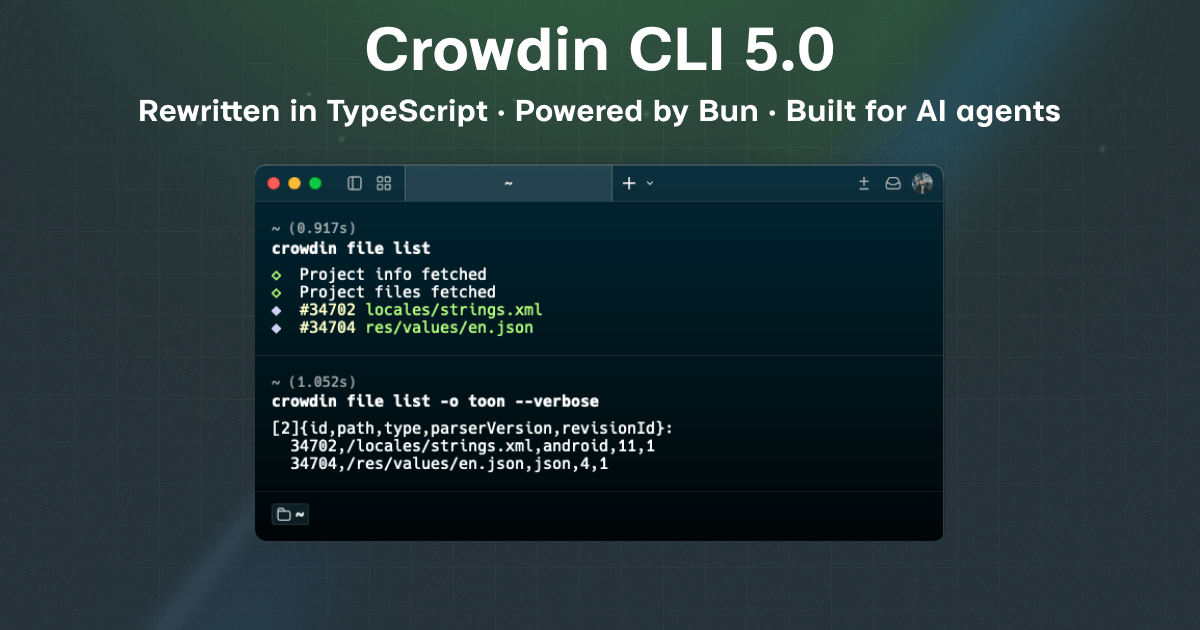
This is the biggest change in the tool's history: a complete rewrite - from Java to TypeScript, powered by Bun. The new CLI is dramatically faster and lighter, built on a modern toolchain that lets us ship improvements faster and unlocks capabilities that weren't practical before.
For existing users, the essentials don't move: the commands, the crowdin.yml configuration file, and the exit codes stay the same. Most workflows carry over unchanged, and the few breaking changes are listed below to make migration easy.
Highlights
Starts instantly
No JVM, no warm-up. The new CLI starts in about a millisecond:
| CLI 4.x | CLI 5.0 | |
|---|---|---|
crowdin --version | 223 ms | 1.6 ms |
crowdin --help | 248 ms | 1.4 ms |
Measured with the standalone CLI 5.0 binary on an Apple Silicon MacBook, median of 10 runs. Your numbers will vary, but the ratio won't: startup is roughly two orders of magnitude faster.
You might not notice 200 ms once. You will notice it in CI, where the CLI is often invoked dozens of times per pipeline.
"Really enjoying the speed up of the CLI in v5 by the way 🚀" - early adopter feedback
No Java required
Crowdin CLI 4.x was a Java application: a 7 MB jar that needed a few hundred megabytes of JRE installed and kept up to date. Crowdin CLI 5.0 ships as a single self-contained binary for macOS, Linux, and Windows - download it and run it. Nothing else to install, patch, or configure.
A friendlier interactive experience
The interactive parts of the CLI got a complete facelift: clean select menus, spinners, and graceful cancellation everywhere. crowdin init walks you from browser authorization through project selection to a ready crowdin.yml in under a minute.
Built for AI agents
CLIs have a new audience. Increasingly, the one typing the command isn't a person but an AI agent - a coding assistant wiring localization into a project, or an automated workflow keeping translations in sync. Agents are heavy CLI users, and they need different things than humans do: deterministic, machine-readable output instead of tables and spinners, and compact responses - every character an agent reads consumes its context window and costs tokens.
Crowdin CLI 5.0 treats agents as first-class users. The new global -o, --output option changes the output format of any command, and two of the three formats are entirely new:
json- finally, machine-readable output. Pipecrowdin file list -o jsonintojqor consume it from any script. Previously, the CLI could only produce human-oriented text.toon- Token-Oriented Object Notation: the same data as JSON in a fraction of the size. Perfect when the consumer of your CLI output is an AI agent or an LLM workflow, where every token counts.plain- minimal, processable text output (replaces the old --plain flag).
In json and toon modes, the CLI gets out of the way: no spinners, no colors, no decorative messages - stdout carries nothing but data.
Here is the same command in json and toon:
$ crowdin file list --output json

[
  {
    "id": 14,
    "path": "src/main/res/values/strings.xml",
    "type": "android",
    "parserVersion": 3,
    "revisionId": 2
  },
  {
    "id": 16,
    "path": "src/locales/en.json",
    "type": "json",
    "parserVersion": 1,
    "revisionId": 5
  }
]
$ crowdin file list --output toon

[2]{id,path,type,parserVersion,revisionId}:
  14,src/main/res/values/strings.xml,android,3,2
  16,src/locales/en.json,json,1,5
The TOON version is about 60% smaller in characters and even cheaper in LLM tokens.
Pair that with millisecond startup and stable exit codes, and you get a tool an agent can call dozens of times in a row - cheaply, quickly, and predictably.
Agent Skills
Your agent doesn't have to learn the CLI by trial and error, either. The new crowdin-cli Agent Skill packages the know-how an agent needs - crowdin.yml configuration patterns, the core sync workflow, machine-readable output, exit codes, and v4 → v5 migration - in a format AI coding agents load automatically. The quickest install, for any tool that supports Agent Skills:
npx skills add crowdin/skills --skill crowdin-cli
There are more ways to install it - as a Claude Code plugin (which also bundles the Crowdin MCP Server), a Gemini CLI extension, or via the GitHub CLI - see the installation options.
More control over auto-translation
The auto-translate command (formerly pre-translate) now exposes the full power of the Crowdin API with a set of new options:
- --scope - choose which strings to auto-translate:
untranslated,translated, orall. - --priority - set the auto-translation queue priority:
low,normal, orhigh. - --skip-approved-translations - leave strings that already have approved translations untouched.
- --replace-translations-option and --reset-approval-status - control what happens to existing translations and their approvals.
- --translation-modified-before - re-translate only strings whose translations were modified before the given date.
- --exclude-label - the counterpart to --label: skip strings with the specified labels.
- --source-language - auto-translate from the specified source language.
See the auto-translate command reference for details.
Shell autocompletion
Crowdin CLI 5.0 ships completions for zsh, bash, fish, and powershell - not just bash. Press Tab to complete commands, subcommands, options, and option values. Setup is a single line in your shell config:
echo 'source <(crowdin complete zsh)' >> ~/.zshrc
See the Autocompletion page for the other shells and setup options.
Installation
The quickest way to install Crowdin CLI 5.0:
npm install -g @crowdin/cli
It's also available via Homebrew, WinGet, Chocolatey, Docker, and the Linux package repositories, plus a standalone binary for macOS, Linux, and Windows. See the Installation page for every option.
Breaking changes
There are only a handful of breaking changes, and each one is easy to deal with - mostly a renamed command or option with a clear one-line fix. Every case below comes with a before/after example, so migrating is usually a quick find-and-replace in your scripts.
pre-translate is now auto-translate
The command has been renamed. There is no alias, so update your scripts:
-crowdin pre-translate --method tm
+crowdin auto-translate --method tm
auto-translate: --translate-untranslated-only removed
The --translate-untranslated-only option (deprecated on the API side) and its --no-translate-untranslated-only form were removed in favor of the new, more flexible --scope option. Translating only untranslated strings is the default, so the positive form can simply be dropped:
-crowdin auto-translate --method tm --translate-untranslated-only
+crowdin auto-translate --method tm

-crowdin auto-translate --method tm --no-translate-untranslated-only
+crowdin auto-translate --method tm --scope all
--plain is now --output plain
The standalone --plain flag is gone; use the global --output option instead:
-crowdin status --plain
+crowdin status --output plain
Negatable options collapsed to single flags
In CLI 4.x, many boolean options were negatable - they accepted both a positive and a --no- form (for example, both --auto-tag and --no-auto-tag). In 5.0, each of these options keeps only the form that changes the default behavior. The defaults themselves are unchanged, so the removed form was always redundant - if your scripts use it, simply drop it:
| Command | Removed form | Migration |
|---|---|---|
upload sources, file upload | --auto-update | Drop it - source files are updated by default. Use --no-auto-update to disable updating. |
file upload | --no-cleanup-mode, --no-update-strings | Drop them - disabled is the default. |
upload translations | --no-auto-approve-imported, --no-import-eq-suggestions, --no-translate-hidden | Drop them - disabled is the default. |
task add | --no-skip-assigned-strings, --no-include-pre-translated-strings-only | Drop them - disabled is the default. |
screenshot upload | --no-auto-tag | Drop it - disabled is the default. |
init | --preserve-hierarchy | Drop it - the generated configuration already sets preserve_hierarchy: true. Use --no-preserve-hierarchy to generate false instead. |
-crowdin upload sources --auto-update
+crowdin upload sources

-crowdin upload translations --no-translate-hidden
+crowdin upload translations
Two cases are not affected, because there both forms do something the other cannot:
string editkeeps --hidden and --no-hidden - they trigger different actions.- On file-based commands,
preserve_hierarchyis the one setting with a configuration-file value to override, so --preserve-hierarchy and --no-preserve-hierarchy are both kept. Passing neither leaves the configured value untouched.
Source cache location
The cache used by upload sources --cache (.crowdin/cache.json) is now resolved relative to your configured base_path instead of the current working directory. The cache lives next to the files it describes and no longer pollutes unrelated directories. The first upload after upgrading may rebuild the cache.
ignore_hidden_files now ignores dot-directories
Previously, only files whose own name starts with a dot were ignored - files inside a hidden directory (for example, .github/config.json) were still uploaded. Now entire dot-directories are skipped. If you rely on uploading files from hidden directories, set ignore_hidden_files: false in your configuration.
distribution add and distribution edit
The deprecated --export-mode and --file options were removed - use --bundle-id instead. The --branch option was dropped as well.
-crowdin distribution add "My Distribution" --export-mode bundle --file strings.xml
+crowdin distribution add "My Distribution" --bundle-id 12
bundle add: options renamed
The pattern options were renamed to avoid clashing with the global config options and to match the underlying API fields:
| Removed | Use instead |
|---|---|
| --source | --source-pattern |
| --ignore | --ignore-pattern |
| --translation | --export-pattern |
-crowdin bundle add "My Bundle" --format json --source "**/*.json" --ignore "node_modules/**" --translation "%locale%/%file_name%"
+crowdin bundle add "My Bundle" --format json --source-pattern "**/*.json" --ignore-pattern "node_modules/**" --export-pattern "%locale%/%file_name%"
context download
The --format option was removed. It only ever accepted jsonl, which is now the sole format, so the flag was redundant - drop it:
-crowdin context download --format jsonl
+crowdin context download
config sources
The --branch option was removed from the crowdin config sources command - it had no effect.
Summary
The rewrite is a beginning, not a finish line: with the new foundation in place, more commands and further improvements to the agentic experience are already on the way. In the meantime - upgrade, run your usual workflows, and tell us how it goes. Early feedback is what turns a big release into a great one.
Need help or have questions? Join the discussion, report an issue, or explore the documentation.